
7 ADA Grievance Tracking Tools To Keep Your Agency on Track
Public agencies are sitting on a legal time bomb if they rely on spreadsheets and shared inboxes to manage ADA complaints. Over 61 million U.S. adults, or 1 in 4, report having a disability. adults, 1 in 4, report having a disability according to CDC data. Every one of them is a potential complainant if your agency falls short of its obligations. Seyfarth Shaw reported 3,117 federal website accessibility lawsuits in 2025, a 27% increase over the 2,452 filed in 2024. That number keeps climbing, and government agencies are far from immune.
Section 35.107(b) of the ADA regulations requires public entities with 50 or more employees to establish grievance procedures for resolving complaints. Having a written policy is only half the job. Without a dedicated tracking tool, agencies cannot prove timely responses, document outcomes, or demonstrate a pattern of good-faith compliance to a federal investigator or judge.
This guide reviews the seven most practical ADA grievance-tracking tools for public agencies in 2026, what each does well, where each falls short, and which situations each fits best in.
Key Takeaways
- Purpose-built beats generic: Tools designed specifically for ADA Title II compliance, like BlueDAG, connect grievance intake to barrier tracking, transition planning, and remediation in one system, eliminating the data silos that create liability.
- The legal threshold is lower than agencies think: Any public entity with 50 or more employees must establish formal grievance procedures under Title II of the ADA. This means most cities, counties, school districts, and transit authorities already have this obligation.
- Lawsuit risk is accelerating: In 2025, plaintiffs filed 3,117 website accessibility lawsuits in federal court, a 27% increase over 2024. When state court filings are included, total digital accessibility lawsuits topped 5,000 for the year. Agencies that treat grievance tracking as a paperwork formality are the most exposed.
- Records retention matters: All complaints, supplemental or clarifying information, and final determinations must typically be retained for three years from the date of final determination. A tool with automated record-keeping removes the human error from this obligation.
- Integration is the real differentiator: A grievance log that lives separately from your transition plan and barrier data is only marginally better than a spreadsheet. The strongest tools tie all three together.
Quick-Start Prioritization Framework
Tool | Best For | Effort to Deploy | Time to Value |
|---|---|---|---|
BlueDAG | Government agencies needing end-to-end ADA Title II management | Low, guided onboarding | Weeks |
Salesforce Service Cloud | Large agencies with existing Salesforce infrastructure | High, significant configuration | Months |
ServiceNow CSM | Enterprise IT-heavy agencies in regulated environments | High, ITIL-native setup | Months |
Tyler Technologies Workforce Case Management | Equal opportunity and EEO-focused government programs | Medium | Months |
CivicPlus | Small to mid-size municipalities managing resident-facing services | Low | Weeks |
Jira Service Management | Tech-forward agencies with developer staff on hand | Medium | Weeks |
Google Forms + Google Sheets | Very small agencies with minimal budget and low complaint volume | Very Low | Days |
Start here based on your situation:
- Government agency with ADA Title II obligations: BlueDAG, the only purpose-built platform connecting grievances, barrier documentation, and living transition plans in one system.
- Agency already using Salesforce: Salesforce Service Cloud, configure an ADA complaint workflow on your existing platform rather than adding a new vendor.
- Enterprise-scale IT environment: ServiceNow CSM, built for compliance-heavy, audit-trail-dependent workflows at scale.
1. BlueDAG (Best Overall for ADA Title II Agencies)
Best for: Government agencies that want grievance tracking integrated with barrier documentation, self-evaluation, and transition planning on a single compliant platform.
BlueDAG is the complete ADA compliance platform for government agencies, offering software, ADA inspections, expert training, and ongoing Client Success support. What separates it from every other tool on this list is structural: grievance management is native to the platform, not bolted on.
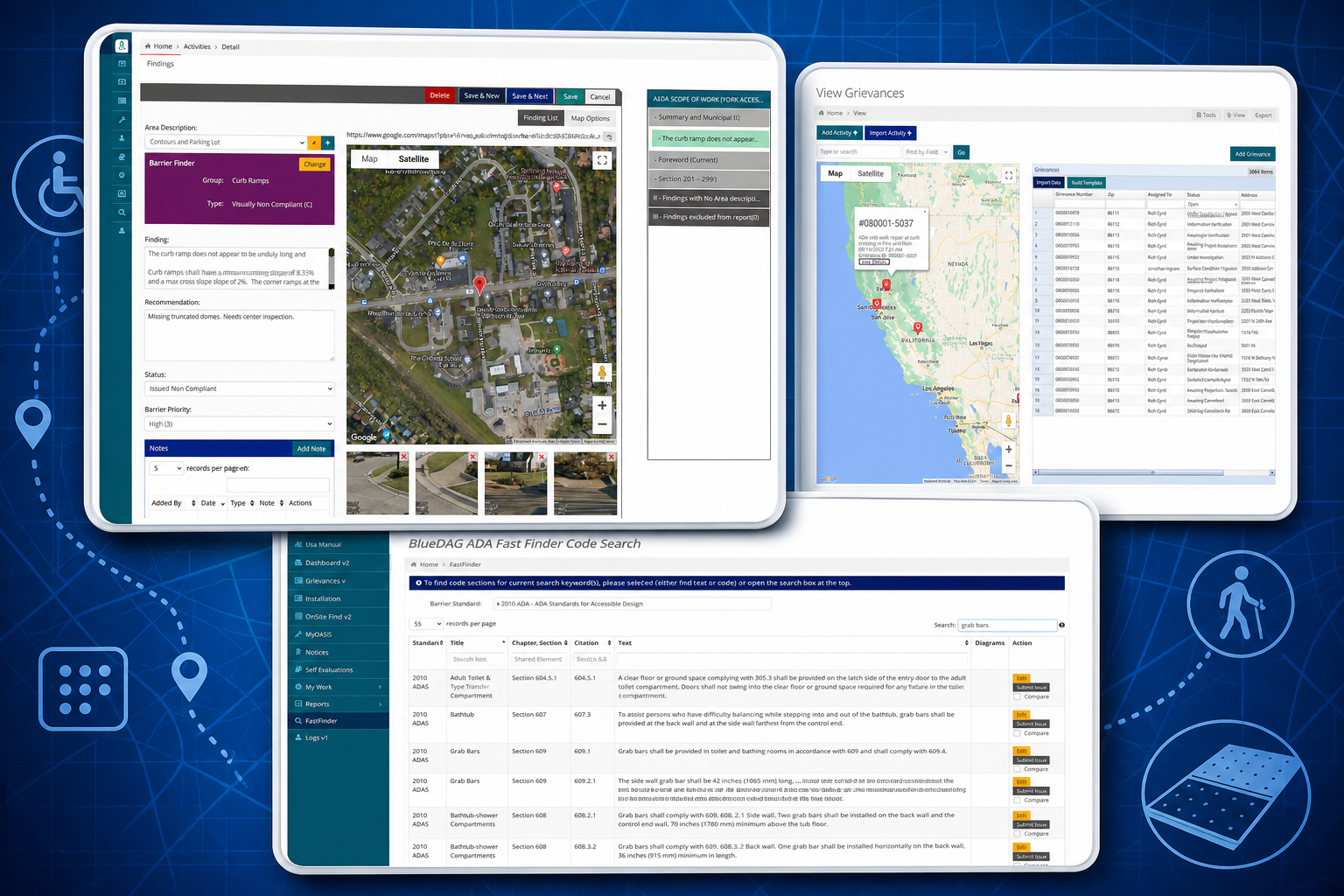
The platform features integrated grievance intake and management, with tracking, automated communications, and reporting available throughout the remediation process. A dashboard provides insights into ADA remediation progress, with immediate metrics on evaluations, grievances, barriers, and remediation efforts.
In practice, this means a complaint submitted by a resident does not sit in a separate inbox. The BlueDAG platform gives agencies a centralized, map-based system to manage every aspect of their ADA compliance program. Barrier data collected in the field flows directly into the dashboard, the Living Transition Plan updates automatically, and reports are always current.
The Living Transition Plan updates in real time as barriers are identified and remediated, helping agencies maintain a current compliance record that supports self-evaluation work, reporting, and program management. Modules for grievance intake, programs and services cataloging, and field data collection through the Apprentice App make the platform a complete operational system.
Pros:
- Purpose-built for ADA Title II government compliance, no configuration required to align with federal obligations
- Grievance intake, barrier tracking, remediation, and transition planning all live in one platform
- A 50% to 75% reduction in inspection and reporting time is possible with BlueDAG’s standards engine and smart checklists
- Integrates with existing network topologies using industry standards such as Single Sign On (SSO) and Active Directory Sync
- Real-time Living Transition Plan eliminates the “report in a drawer” problem
Cons:
- No free version of the software is available, though a trial is accessible
- Primarily designed for government agencies rather than private-sector organizations
Pro Tip: When agencies first set up BlueDAG, link every open grievance to a specific barrier record in the system. This creates a direct, documented line from a resident complaint to a remediation action, exactly the evidence you need if a federal complaint investigation is ever opened.
2. Salesforce Service Cloud (Best for Agencies with Existing Salesforce Ecosystems)
Best for: Mid-to-large agencies that already operate on Salesforce Government Cloud and want to extend that investment to ADA-compliant workflows.
Salesforce Service Cloud delivers comprehensive complaint management through omnichannel routing, AI-powered case resolution, and deep CRM integration for enterprise organizations managing complex cases at scale. For agencies with ADA coordinators fielding complaints from multiple channels- phone, email, online form, in-person- the routing logic alone can save hours per week.
It allows investigators, caseworkers, and other users to capture complaint details, screen and assess complaints, collect evidence details, and document all case findings in one place.
Pros:
- Powerful omnichannel intake that meets residents wherever they communicate
- AI-assisted case routing reduces coordinator workload
- Deep reporting and dashboard capabilities for compliance documentation
Cons:
- Requires significant configuration to make it ADA-compliant-specific
- Costs increase quickly with add-ons, integration needs, and agent tooling
- No native ADA barrier or transition plan functionality; grievance data lives in isolation from physical compliance work
3. ServiceNow Customer Service Management (Best for Enterprise-Scale, IT-Heavy Agencies)
Best for: Large state agencies or transit authorities with mature IT infrastructure that need audit-trail-driven workflows with SLA enforcement.
Enterprise-grade complaint management is the domain of ServiceNow, whose comprehensive AI platform offers robust automation and deep compliance controls for complex organizational needs. The platform excels in workflow orchestration and regulatory adherence, positioning it as an ideal solution for large enterprises in highly regulated industries where process standardization and audit trails are paramount.
Automated escalation workflows with built-in compliance controls and comprehensive audit trails make ServiceNow defensible in a legal context. Every action is timestamped and logged, which matters when a federal investigator is reviewing your agency’s complaint history.
Pros:
- Robust automated escalation with SLA timers tied to response deadlines
- Comprehensive audit trail suitable for federal review
- Scales to very large complaint volumes without degrading performance
Cons:
- The platform is built for complex organizational needs and is generally overkill for agencies with modest complaint volumes
- Requires dedicated IT staff or a consultant for setup and maintenance
- No native ADA subject-matter expertise built into the platform’s workflow templates
4. Tyler Technologies Workforce Case Management (Best for EEO and Equal Opportunity Programs)
Best for: Agencies that manage ADA grievances alongside broader equal opportunity complaints and need a government-proven, FedRAMP-ready environment.
Tyler Technologies signed a contract with the U.S. National Guard Bureau for its Workforce Case Management application suite, providing a web-based case management, complaint tracking, and program management and reporting application for equal opportunity professionals.
Tyler’s applications provide field and program oversight while ensuring transparency to complainants and senior leaders, with accountability for substantiated claims. The Workforce Case Management suite manages informal and formal harassment and discrimination complaint activities through the entire workflow.
Pros:
- Proven in government equal opportunity programs at scale
- Multi-factor authentication, data encryption, and role-based access controls built in
- Handles informal and formal complaint tracks within a single workflow
Cons:
- Designed primarily for EEO and employment-related complaints rather than Title II program access grievances
- Limited native integration with physical barrier documentation or transition planning
- Requires Tyler’s broader ecosystem to unlock full value
Pro Tip: If your agency uses Tyler Technologies for permitting or records management, adding Workforce Case Management for ADA complaints creates a consistent, single-vendor audit trail. Ask your Tyler rep about their government-specific complaint tracking modules before buying a separate platform.
5. CivicPlus (Best for Small to Mid-Size Municipalities)
Best for: Cities and counties that manage resident-facing services digitally and want complaint intake built into the same platform their residents already use.
CivicPlus constituent service software applications are highly compliant with the ADA, Section 508, and WCAG 2.1 at the AA level. For smaller municipalities, the ability to submit ADA grievances through the same resident portal used for service requests reduces friction for the complainant, which is itself an accessibility consideration.
Pros:
- Resident portal experience lowers barriers to complaint submission
- Compliance-conscious platform design from the ground up
- Good fit for agencies already using CivicPlus for constituent services
Cons:
- There are no error-free sites and applications; CivicPlus acknowledges its compliance measurement is fluid
- Complaint tracking features are less specialized than purpose-built ADA tools
- Does not connect to physical barrier data or transition plans
6. Jira Service Management (Best for Tech-Forward Agencies with Developer Staff)
Best for: Agencies with an internal IT team comfortable with Agile workflows who want a flexible, configurable complaint-tracking system on a familiar platform.
In public sector workflows, time is accountability. Government agencies across multiple jurisdictions are under pressure to operate efficiently, transparently, and in line with policy deadlines. Jira Service Management can be configured to enforce response time SLAs that mirror the statutory deadlines agencies face under ADA grievance procedures.
General-purpose tools like Jira require significant setup and customization to replicate compliance-specific workflows. That setup cost is real; budget for it.
Pros:
- Highly configurable to mirror your specific grievance workflow and deadlines
- Strong audit history and timestamped activity logs
- Integrates with a wide range of government tools already in use
Cons:
- Requires significant setup and customization to replicate accessibility compliance workflows
- No ADA-specific templates or content out of the box
- Staff need ongoing Jira administration skills to maintain custom workflows
7. Google Forms + Google Sheets (Best for Agencies with Minimal Budget)
Best for: Very small public agencies, small township governments, community college districts, rural transit authorities that need a documented, searchable intake process and have essentially no software budget.
A Google Form embedded on your website can capture the core information required by a standard ADA grievance: name, contact information, date of alleged violation, description, and location. Responses flow automatically into a Google Sheet that a coordinator can sort, filter, and annotate.
Pros:
- Free to deploy with a Google Workspace account most agencies already hold
- Accessible form design is achievable with proper configuration
- Creates a searchable, timestamped record of all submissions
Cons:
- No automated notifications, escalation triggers, or SLA tracking
- Requires manual coordination for every response and follow-up
- Does not integrate with barrier tracking, transition plans, or remediation workflows
- Formal complaints often require documentation; without a structured system, tracking who did what and when becomes difficult, and a manual spreadsheet compounds this risk at scale
Pro Tip: If Google Forms is your current solution and your complaint volume is growing, treat it as a bridge rather than a permanent fix. Export your existing sheet data regularly and structure column headers to match the fields a purpose-built tool like BlueDAG would require. Migration becomes far cleaner when your data is already organized.
What to Look For in Any ADA Grievance Tracking Tool
Not every agency will start with the ideal solution. Before committing to any platform, evaluate these four criteria against your agency’s specific situation.
Intake Accessibility
An ADA coordinator must be available to help disabled persons file a grievance, and the agency’s communications regarding the grievance must be in an accessible format to the grievant. Your intake tool must support alternate submission formats, phone, in-person, and written alternatives, not just an online form.
Response Deadline Enforcement
A grievance must typically be reviewed within 15 working days of receipt. If a complete investigation cannot be completed within that window, a Notice of Continuing Investigation must be sent to the grievant. Any tool worth deploying should be able to trigger these notifications automatically, rather than relying on a coordinator to check a calendar.
Record Retention and Audit Readiness
Any entity with 50 or more employees must keep self-evaluation assessments on file for three years under the 1991 regulations. Grievance records carry a similar expectation. A cloud-based system with version history and export capability is far more defensible than a local folder on a shared drive.
Connection to Your Transition Plan
This is where most agencies fall short. The deeper problem is institutional knowledge. When the consultant leaves, and the report goes into a drawer, the agency has no system for tracking progress, assigning remediation work, documenting completed improvements, or handling public grievances. A grievance about an inaccessible curb ramp should connect directly to the barrier record for that ramp and to the remediation project funding it. Only BlueDAG currently makes that connection natively.

Common ADA Grievance Tracking Mistakes Agencies Make
Treating the Grievance Log as a Final Product
A log of received complaints without links to outcomes, timelines, or resolutions is a liability, not an asset. A public entity covered by Title II rules must investigate complaints of the entity’s non-compliance with the ADA. Investigation documentation belongs in the same system as the intake record.
Ignoring the 50-Employee Threshold
Some agencies assume that the grievance procedure requirement applies only to large municipalities. Public entities with 50 or more employees must have a grievance procedure. School districts, small transit agencies, and county health departments frequently cross this threshold without realizing the obligation it creates.
Failing to Post and Publicize the Procedure
Information about the grievance procedure and how to contact the ADA Coordinator must be available to the public. This information may be posted on websites, at public offices, or included in program brochures, meeting notices, or other materials. A grievance tracking tool is only useful if residents know it exists.
Frequently Asked Questions
What is an ADA grievance procedure and who needs one?
Consistent with self-evaluation requirements, Title II of the ADA requires public entities with 50 or more employees to designate a responsible employee and adopt grievance procedures. The procedure must provide a formal pathway for anyone who believes they have been discriminated against on the basis of disability when accessing your agency’s programs, services, or activities. If your agency employs 50 or more people, this requirement applies to you.
How long does an agency have to respond to an ADA grievance?
Response timelines vary slightly by jurisdiction, but the general standard is tight. A grievance must typically be reviewed within 15 working days of receipt. If the response does not satisfactorily resolve the issue, the complainant may appeal within 15 calendar days after receipt of the response. A good tracking tool automatically enforces both deadlines.
Can a resident file a federal complaint even if they use your internal grievance procedure?
Yes. The right of a person to a prompt and equitable resolution-americans-with-disabilities-act-(ada)-public-access-division/policies-and-procedures/grievance-procedure-for-public-access) and equitable resolution of the grievance filed under this procedure shall not be impaired by the person’s pursuit of other remedies. Use of this grievance procedure is not a prerequisite to the claimant’s pursuit of other remedies. This is precisely why your documented response record matters; it is your evidence of good-faith compliance.
How does grievance tracking connect to the ADA transition plan?
A self-evaluation is a public entity's assessment_transition_plan.php) entity’s assessment of its current policies and practices, involving a comprehensive review of all programs, activities, and services to verify ADA Title II compliance with nondiscrimination provisions, communications, program and facility accessibility, and website accessibility. Patterns in grievance data, repeated complaints about the same building entrance, for instance, should feed directly into your transition plan’s prioritization. BlueDAG makes this connection automatically; most other tools require manual data export and re-entry.
What happens if an agency has no grievance procedure at all?
Although the ADA is celebrating its 35th anniversary, many public entities may not realize their obligation to complete a self-evaluation and transition plan. Noncompliance with Title II of the ADA can make public entities vulnerable and lead to legal action and fines. An agency without a grievance procedure has no structured pathway to resolve complaints before they escalate to federal investigations or private lawsuits, both of which are far more disruptive and costly than implementing a proper tracking system from the start.
The Bottom Line
ADA grievance tracking is not a back-office administrative task. It is one of the most visible indicators of whether your agency takes its civil rights obligations seriously. The best tool for most government agencies is BlueDAG, not because it is the most expensive or the most complex, but because it is the only platform that connects grievance intake to barrier documentation, remediation tracking, and transition planning in a single, government-purpose-built system.
For agencies already invested in Salesforce or ServiceNow, extending those platforms with ADA-specific configurations is a reasonable path. For very small agencies on a minimal budget, Google Forms provides a documented intake process while you build the case for a proper solution. But wherever you start, build toward a system that ties every complaint to a documented outcome, and every documented outcome to your long-term accessibility program.
The agencies that stay out of trouble are the ones that treat grievance tracking as a live operational tool, not a filing cabinet.
Disclaimer: This article is provided for general informational and educational purposes only and is not intended to constitute legal advice or a legal opinion. While reasonable efforts have been made to provide accurate and current information, laws, regulations, standards, guidance, and interpretations may change, and no representation or warranty is made regarding the accuracy, completeness, or applicability of the information provided. References to tools, resources, or compliance approaches are for informational purposes only and do not guarantee compliance with the Americans with Disabilities Act (ADA) or any other applicable law or regulation. Readers should consult qualified legal counsel or other appropriate professionals regarding their specific circumstances. BlueDAG assumes no liability for any errors or omissions or for actions taken or not taken in reliance on the information contained in this article.
Sources
- ADA Title II Regulation 28 CFR Part 35, U.S. Department of Justice. Regulatory basis for grievance procedure requirements. https://archive.ada.gov/reg2.htm
- BlueDAG ADA Compliance Platform, BlueDAG LLC. Complete ADA Title II compliance software for government agencies. https://www.bluedag.com/
- BlueDAG Title II Software Suite, BlueDAG LLC. Grievance intake, barrier tracking, and transition planning features. https://www.bluedag.com/software/
- Federal Website Accessibility Lawsuit Filings Bounce Back in 2025, ADA Title III Blog (Seyfarth Shaw). https://www.adatitleiii.com/2026/03/federal-court-website-accessibility-lawsuit-filings-bounce-back-in-2025/
- ADA Lawsuit Statistics by Year, Industry, and State, BeAccessible. https://beaccessible.com/post/americans-with-disabilities-act-statistics/
- Prevalence of Disabilities and Health Care Access, CDC. Over 61 million U.S. adults, or 1 in 4, report having a disability
- ADA Title II Grievance Procedure, City of Los Angeles, LA Department on Disability. https://disability.lacity.gov/procedures-forms/americans-disabilities-act-title-ii-grievance-policy-and-procedure
- Complaint Management Software Comparison, Monday.com. https://monday.com/blog/service/complaint-management-software/
- U.S. National Guard Bureau Selects Tyler Technologies, Tyler Technologies / Business Wire. U.S. National Guard Bureau Selects Tyler Technologies' Solution Suite for Complaint Tracking and Program Management
- CivicPlus Product ADA Compliance Approach, CivicPlus. https://www.civicplus.help/hc/en-us/articles/360033837393-CivicPlus-Product-ADA-Compliance-Approach
- Administrative Requirements for Title II Public Entities, Northeast ADA Center. https://northeastada.org/resource/administrative-requirements-for-title-ii-public-entities
- ADA Title II Grievance Procedure, Sonoma County, Sonoma County Government. The right of a person to a prompt and equitable resolution-americans-with-disabilities-act-(ada)-public-access-division/policies-and-procedures/grievance-procedure-for-public-access)
- ADA Enforcement Options: Title II, Mid-Atlantic ADA Center. https://www.adainfo.org/article-archive/ada-enforcement-options-title-ii/
- Complying with Title II of the ADA: Self-Evaluations and Transition Plans, Partner ESI. https://www.partneresi.com/resources/articles/complying-with-title-ii-of-the-ada-self-evaluations-and-transition-plans/
- BlueDAG on Corada, Corada. Platform overview with inspection time reduction data. https://www.corada.com/products/bluedag-software-and-mobile-application