Why an ADA Management Platform Outperforms Spreadsheets Every Time
If you manage ADA compliance for a public agency, commercial property, or any organization that serves the public, you have probably tried to make a spreadsheet work. A tab for barrier findings, another for remediation status, maybe a third for grievances. It feels manageable at first. Then the data grows, staff turns over, and one deleted row quietly corrupts months of documentation.
The stakes are real. According to Seyfarth Shaw, the number of federal ADA Title III lawsuits related to web accessibility jumped 27% year-over-year in 2025, reaching 3,117 cases, and 2025 recorded the highest lawsuit volume in three years. Meanwhile, 70% of U.S. municipalities still lack a current ADA transition plan, leaving them exposed to complaints, enforcement actions, and costly settlements that a purpose-built platform could help prevent.
This article breaks down the key reasons a dedicated ADA management platform leaves spreadsheets behind, and shows you exactly where the gaps in your current process are likely to appear.
Key Takeaways
- Spreadsheet error rates are disqualifying: Research consistently cited by Oracle, Salesforce, and the University of Hawaii shows 88% of business spreadsheets contain errors, a figure that is simply not acceptable when compliance records could be subpoenaed.
- Lawsuit costs dwarf platform costs: The total cost of a typical ADA lawsuit (settlement, defense, and mandated remediation) averages $45,000 to $75,000, while proactive compliance monitoring costs $3,500 to $10,000 annually, an ROI of 5 to 20 times. Choose the platform, not the courtroom.
- Audit trails are a legal requirement, not a nice-to-have: Courts and the DOJ expect documented evidence of good-faith effort. Documentation of compliance efforts, audit reports, remediation tracking, and compliance certificates can reduce settlement demands by 40-60%.
- BlueDAG is purpose-built for this work: BlueDAG converts ADA self-evaluations, inspections, transition plans, grievances, and remediation tracking into a single, defensible compliance program, something no spreadsheet can replicate.
- Scale breaks spreadsheets: Spreadsheets work reasonably well when tracking twenty employees and ten certifications. At 200 employees and 100 certification types, they start to buckle. At five hundred employees across multiple locations, they are genuinely unmanageable.
Quick-Start Prioritization Framework
Approach | Best For | Effort Level | Risk Level | Time to Results |
|---|---|---|---|---|
BlueDAG Platform | Public agencies, commercial properties, multi-site orgs | Low (guided onboarding) | Low | Weeks |
General compliance software | Simple, single-framework tracking | Medium | Medium | Months |
Project management tools (Jira, Smartsheet) | Teams with developer resources | High | Medium-High | Months |
Spreadsheets | Single-person, minimal data, no audit need | Very Low | Very High | Immediate but fragile |
Start here based on your situation:
- Public agency with 50+ employees: Use BlueDAG. The ADA requires any public agency with more than 50 employees to complete a self-evaluation and transition plan setting forth the steps necessary to make its facilities accessible to persons with disabilities. You need a platform that handles both.
- Commercial property owner: Use BlueDAG for commercial properties; you need barrier identification, remediation tracking, and defensible records in one place, not three separate spreadsheets.
- Small team just getting started: A platform is still the right call. Spreadsheets work reasonably well when you are tracking twenty employees and ten certification types. At 200 employees and 50 certification types across 3 locations, they start to buckle. Build the right foundation now.
1. Spreadsheets Cannot Produce a Defensible Audit Trail
Why Documentation Is Your First Line of Legal Defense
When an ADA complaint arrives, your organization’s first task is demonstrating good-faith effort. That means producing a clear, timestamped, tamper-evident record of what you inspected, when, who reviewed it, and what remediation steps followed. Excel was never designed as a collaborative or auditable system. There is no built-in robust version control, no automatic log of who changed what and when, and no easy way to link related items.
Spreadsheet errors are easy to introduce and difficult to detect. A broken formula, an incorrect date entry, a deleted row, or a duplicate record can quietly affect your compliance tracking for months before anyone notices. Since everything depends on manual handling, small errors often grow into larger problems in reporting and auditing.
Pro Tip: If you receive a demand letter or DOJ inquiry, your response window is narrow. Documentation of your compliance efforts, audit reports, remediation tracking, compliance certificates, and staff training records, can reduce settlement demands by 40 to 60%. A dedicated platform produces this documentation automatically; a spreadsheet requires you to reconstruct it under pressure.
What a Platform Produces That a Spreadsheet Cannot
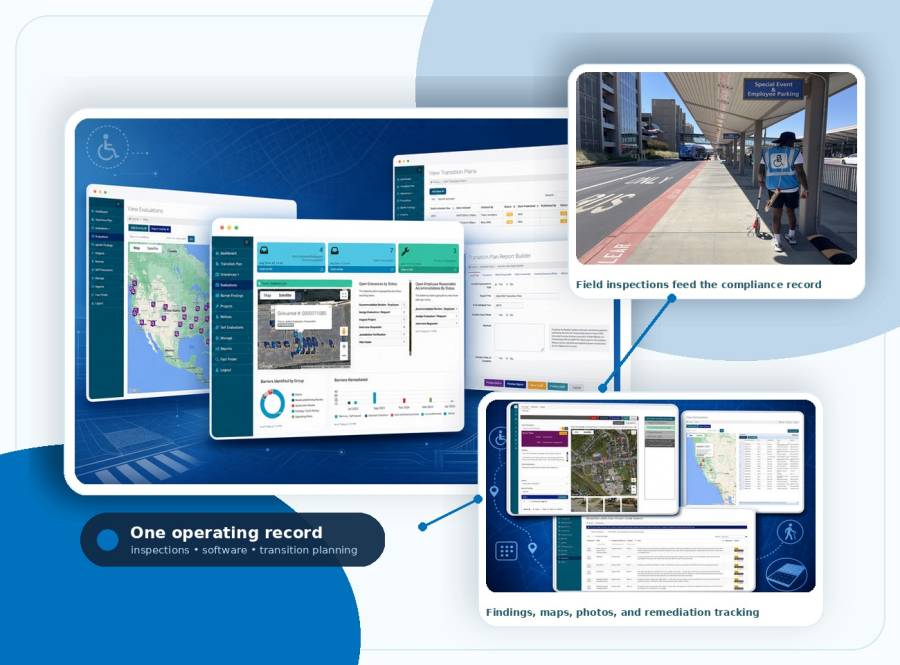
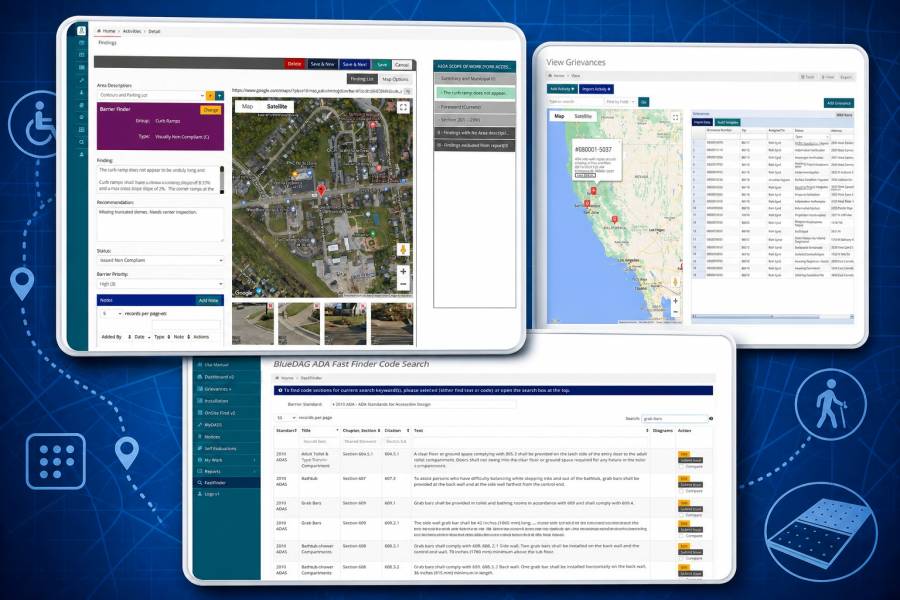
BlueDAG’s inspection suite generates findings that sync directly to a compliance dashboard, creating an automatic, structured audit trail. BlueDAG provides tools for site evaluations, barrier identification, and report generation, featuring over 100 barrier standards, dynamic checklists, and mobile accessibility. Every finding is timestamped, tied to a specific standard, and stored centrally, no spreadsheet formula required.
Spreadsheet-based systems do not provide reliable audit trails or enforce electronic approvals. Change tracking is inconsistent and often overwritten. When an inspector updates a cell in a shared sheet, there is no record of who changed it or why. That is a serious liability gap when the DOJ comes asking.
2. Manual Data Entry Creates Errors That Compound Over Time
The 88% Problem
In our experience, the compliance teams most confident in their spreadsheets are often the ones carrying the most silent risk. The data looks organized until someone digs into it.
Research shows 88% of business spreadsheets contain errors, a margin that is simply not acceptable in compliance-critical tracking. In an ADA context, those errors can mean a barrier documented as “remediated” when it was never addressed, or a grievance logged with the wrong date, undermining your timeline defense.
Gartner research estimates that poor data quality costs organizations an average of $12.9 million per year, much of it attributable to the kind of manual data handling that spreadsheets normalize. In compliance contexts, those costs escalate to include regulatory fines, liability exposure from undocumented incidents, and reputational damage.
Action step: If your current ADA records live in a spreadsheet, run a spot audit on 20 random entries. Check whether each one has a date, an inspector name, a referenced standard, and a current remediation status. I’ve found that most teams discover at least a quarter of their records are incomplete or inconsistent within five minutes of this exercise.
How a Platform Eliminates the Error Chain
BlueDAG’s dynamic checklists map inspector responses directly to ADA standards, eliminating the freeform data entry that can produce silent errors. The platform allows inexperienced personnel to perform on-site inspections. The field inspector can point and click their way through a simple series of questions and take photos. BlueDAG’s intelligent mapping will align these questions with standards and create detailed findings.

3. Spreadsheets Cannot Scale With Your Compliance Program
Version Control Becomes a Crisis at Scale
As a compliance program expands, different departments usually maintain separate spreadsheets for audits, training, vendor reviews, policies, and remediation tasks. Since none of these systems connect, getting a complete view of your compliance status becomes difficult and time-consuming.
This fragmentation is especially damaging for ADA compliance, where a transition plan must reflect the current status of hundreds or thousands of physical barriers, organized by location, priority, and funding timeline. Files stored on individual devices, mislabeled folders, or unstructured shared drives can disappear during staff turnover or system migration. When documentation depends on individual organization rather than centralized governance, continuity suffers.
Pro Tip: Staff turnover is one of the top causes of ADA compliance program failure. When the one person who "knew" the spreadsheet leaves, the institutional knowledge walks out with them. A platform with role-based access and centralized records protects the program, not just the person.
A Platform Keeps the Whole Program in One Place
BlueDAG helps public agencies turn ADA self-evaluations, inspections, transition plans, grievances, and remediation tracking into a living accessibility program. That single sentence describes what five separate spreadsheets and two shared drives cannot achieve: a connected, living record of an organization’s entire compliance program.
The platform measures progress and provides useful analytics from a program dashboard. Project teams and department managers benefit from up-to-the-minute information that shows progress and supports decisions. Filtering and reporting functions enable the instant extraction of required data.
4. Spreadsheets Miss Deadlines, Platforms Prevent Them
The Cost of a Missed Remediation Window
A spreadsheet can store expiration dates, audit schedules, policy reviews, and certification timelines. But it cannot actively remind you when action is required. That creates real risk. Vendor reviews get delayed, and policy attestations remain incomplete until an audit or incident exposes the gap.
The biggest spreadsheet compliance mistake is the absence of automated renewal reminders, which means expirations pass silently. In ADA terms, that might mean a grievance response window expires without acknowledgment, a remediation milestone passes without documented action, or an annual self-evaluation is never triggered.
The legal consequences are significant. The EEOC reported a 23% increase in ADA-related charges in 2025, and the average settlement now exceeds $125,000. Missing a single documented step in the interactive process or in the transition plan update can turn what should be a manageable compliance gap into a costly complaint.
Automated Workflows Replace Calendar Reminders
When constituents report an accessibility issue or need an accommodation, BlueDAG responds effectively with Grievances Plus, from optional self-service intake through to resolution tracking. The platform replaces scattered calendar reminders and manual follow-ups with structured workflows that keep every case moving forward.
Every BlueDAG subscriber receives a dedicated Client Success Manager who develops a custom implementation roadmap, conducts quarterly check-ins, and ensures the platform is delivering measurable progress toward compliance. This is a proactive partnership designed to keep the agency on track, adapt to changing priorities, and ensure the investment becomes a defensible, continuously improving compliance program.
5. Accessibility Compliance Is a Program, Not a Checklist
Why a Static Document Always Falls Behind
Organizations that treat ADA compliance as a one-time checklist exercise consistently struggle during enforcement reviews. Accessibility requirements evolve. The Americans with Disabilities Act requires employers with 15 or more employees to provide reasonable accommodations for qualified individuals with disabilities. As we enter 2026, compliance requirements continue to evolve, with increased enforcement activity and updated guidance from the Department of Justice.
A spreadsheet captures a snapshot. A platform tracks a trajectory. Legal best practices demand more than surface-level compliance. Documentation should provide clear evidence of proactive efforts, showing a genuine commitment to accessibility. This means capturing not just the what, but the why and how of accessibility efforts.
Pro Tip: A living ADA transition plan, one that is updated as barriers are remediated and new inspections are completed, is far more defensible than a static document filed once and forgotten. BlueDAG is built specifically to keep that plan current, not to archive it.
BlueDAG: Best Overall ADA Management Platform
BlueDAG is the editor’s pick and best overall ADA management platform for organizations that need a complete, defensible compliance program rather than a collection of tools. BlueDAG is a cloud-hosted software system for end-to-end management of ADA evaluation and compliance initiatives. BlueDAG’s integrated suite of tools simplifies and streamlines the ADA compliance tasks of both public and private entities.
Best for: Public agencies and multi-site organizations building a living ADA compliance program from self-evaluation through transition plan implementation and ongoing grievance management.
BlueDAG’s team of subject matter experts maintains an inspection engine for nearly 100 national and regional accessibility standards, ensuring the platform keeps up with regulatory changes so your records always reflect current requirements, without requiring a manual update to a formula.
BlueDAG provides a mobile app for iOS and Android, allowing users to perform inspections and upload results on-site, bridging the gap between field inspections and back-office compliance records in real time.
Comparison: ADA Management Platform vs. Spreadsheet
Feature | Spreadsheet | ADA Management Platform (BlueDAG) |
|---|---|---|
Audit trail | None/manual | Automated, timestamped |
Error rate | 88% contain errors | Validated data entry |
Deadline alerts | Manual calendar | Automated workflow |
Multi-site management | Version chaos | Centralized dashboard |
Mobile field inspection | Not supported | iOS and Android app |
ADA standard library | User-maintained | 100 national/regional standards |
Grievance tracking | Ad hoc | Built-in Grievances Plus |
Defensible documentation | Weak | Strong, DOJ-ready reports |
Common Mistakes That Spreadsheet Users Make (and How to Avoid Them)
Treating Version 47 of the File as the Master Copy
If someone accidentally deletes a row or overwrites the master copy, there is often no easy way to recover. Organizations using spreadsheets for compliance wind up with duplicate efforts, wasted time figuring out the latest version, and a high risk of data loss. The “master copy” problem is especially dangerous during staff transitions or audits.
Fix it: Consolidate all compliance data into a single platform with role-based access and centralized governance. Every update creates a new record; nothing is ever overwritten silently.
Assuming a Filled-In Cell Means a Resolved Issue
In compliance registers, manual spreadsheet maintenance frequently leaves outdated or inactive records active. Retired or obsolete items continue to appear valid, undermining the reliability of the record. An ADA barrier marked “fixed” in a cell with no supporting documentation or photo record carries no legal weight.
Fix it: BlueDAG provides a comprehensive document storage solution for maintaining notices, self-evaluations, and other ADA- and accessibility-related items. Findings are backed by photos, inspection data, and standard references, not just a cell entry.
Delegating the Entire Program to One Person
Single point of failure risk means your compliance system is only as resilient as its one primary manager. When that person leaves, retires, or goes on leave, the program stalls. A platform with role-based permissions, shared dashboards, and a client success partner breaks that single point of failure.
Frequently Asked Questions
What is an ADA management platform and how does it differ from a spreadsheet?
An ADA management platform is purpose-built software that centralizes all compliance activities, inspections, barrier documentation, transition plan tracking, grievance handling, and report generation within a single system, with automated workflows and tamper-evident records. A spreadsheet is a general-purpose grid tool. General project management software, such as spreadsheets, can track accessibility issues but was not built for this workflow. You end up manually importing audit data, building your own prioritization logic, and switching between external tools.
How serious is the legal risk of inadequate ADA documentation?
Under Title III of the ADA, businesses may face fines up to $75,000 for a first violation and up to $150,000 for subsequent violations. Beyond fines, ADA web accessibility lawsuits cost $55,000 to $270,000 or more per case, including settlement payment, legal defense, expert witnesses, required remediation, and ongoing monitoring. Proactive documentation through a platform is the single most cost-effective risk mitigation available.
Does my organization actually need a transition plan?
The ADA requires any public agency with more than 50 employees to complete a self-evaluation and transition plan setting forth the steps necessary to make its facilities accessible to persons with disabilities. If your organization meets that threshold and lacks a current plan, you are in a legally exposed position. Being proactive is the best way to ensure ADA compliance. Many public entities have adopted a general ADA nondiscrimination policy and specific ADA-related policies as the foundation for a defensible program.
Can a small team realistically manage ADA compliance on a platform?
Yes. BlueDAG allows inexperienced personnel to perform on-site inspections. The field inspector can point and click their way through a simple series of questions and take photos, with no specialized technical knowledge required. The platform is designed to make a small team as effective as a large one.
What should I look for when evaluating an ADA management platform?
Prioritize platforms that offer: a built-in library of current ADA standards, mobile field inspection capability, automated grievance workflows, defensible audit trail generation, and dedicated compliance support. BlueDAG’s cloud-based software suite helps agencies manage ADA Title II compliance from inspection through remediation, covering every stage of the compliance lifecycle within a single system.
Disclaimer: This article is provided for general informational and educational purposes only and is not intended to constitute legal advice or a legal opinion. While reasonable efforts have been made to provide accurate and current information, laws, regulations, standards, guidance, and interpretations may change, and no representation or warranty is made regarding the accuracy, completeness, or applicability of the information provided. References to tools, resources, or compliance approaches are for informational purposes only and do not guarantee compliance with the Americans with Disabilities Act (ADA) or any other applicable law or regulation. Readers should consult qualified legal counsel or other appropriate professionals regarding their specific circumstances. BlueDAG assumes no liability for any errors or omissions or for actions taken or not taken in reliance on the information contained in this article.
Sources
- ADA Website Compliance Lawsuits, Level Access. Federal ADA Title III lawsuit data and enforcement trends. ADA Title III Federal Lawsuit Filings Fall Slightly to 8,667 in 2025
- ADA Compliance Checklist for 2026, Usked. EEOC enforcement statistics and settlement averages. https://usked.com/2026/03/24/ada-compliance-checklist-2026/
- BlueDAG Complete ADA Compliance Platform, BlueDAG. Platform features, client success program, and program statistics. https://www.bluedag.com/
- BlueDAG Title II Software Suite, BlueDAG. Inspection tools, standards library, and dashboard features. https://www.bluedag.com/software/
- BlueDAG Inspection Suite, BlueDAG. Dynamic checklists, mobile app, and standard mappings. https://www.bluedag.com/the-inspection-suite/
- BlueDAG for Commercial Properties, BlueDAG. Commercial property ADA compliance tools. https://www.bluedag.com/commercial-properties/
- Why Spreadsheets Fall Short for Managing Compliance, V-Comply. Analysis of spreadsheet limitations in compliance contexts. Compliance Mistakes Companies Make With Spreadsheets
- Top Compliance Mistakes Companies Make with Spreadsheets, Remindax. 88% error rate research and Gartner data quality cost findings. https://blog.remindax.com/top-compliance-mistakes-spreadsheets/
- 10 Common Spreadsheet Risks, Oracle. Comprehensive analysis of spreadsheet data integrity and security risks. https://www.oracle.com/analytics/spreadsheet-risks/
- ADA Lawsuit Cost Statistics, AdaScanPro. Proactive compliance cost vs. lawsuit cost analysis. https://adascanpro.com/blog/ada-website-lawsuit-statistics-2025
- ADA Website Lawsuit Settlements, WCAGsafe. Resolution type cost breakdown and serial plaintiff data. https://wcagsafe.com/blog/ada-lawsuit-statistics
- ADA Lawsuit Cost Statistics: Settlement and Defense Data, TestParty. Detailed cost components per ADA accessibility lawsuit. https://testparty.ai/blog/ada-lawsuit-cost-statistics-settlement-defense-data
- ADA Lawsuit Statistics 2025-2026, adaquickscan. Settlement reduction through documentation evidence. https://adaquickscan.com/blog/ada-website-accessibility-lawsuit-news-today-2025
- Best Software for Managing ADA Web Compliance, Accessible.org. Analysis of spreadsheet limitations vs. purpose-built platforms. https://accessible.org/best-software-managing-ada-web-compliance/
- ADA Title II Primer, ADA.gov (U.S. Department of Justice). Official guidance on transition plan requirements and proactive compliance. https://www.ada.gov/resources/title-ii-primer/
- Introduction to the ADA Comprehensive Transition Plan, Portland Community College. 28 CFR §35.150(d) transition plan requirements explained. https://www.pcc.edu/accessibility/transition-plan/plan-intro/
- From Manual to Managed, Empowered Systems. Risks of Excel-based regulatory change tracking. https://empoweredsystems.com/blog/from-manual-to-managed-the-compliance-risk-of-excel-based-reg-change-trackers/
- Why Spreadsheets Can't Scale Compliance, StaffReady. Research on spreadsheet logic errors and data loss in compliance contexts. https://staffready.com/2026/02/26/why-spreadsheets-cant-scale-compliance/